Wednesday, September 24, 2014

oracle.security.fed.event.EventException: Could not find the AuthnRequest associated to the Assertion

In this scenario, we have two OIF 11.1.1.7.0 servers set up on serverA acting as an IdP and serverB acting as an SP.

Start federation by going to the SP as follows:
http://10.10.107.100:7777/fed/user/testspsso

On the Initiate Federation SSO page, click Start SSO.

This directs the page to the IdP at:
http://serverA:7777/fed/idp/samlv20

On the login screen, enter a username and password that exists in the IdP:

Click Sign In.  The following error is shown on the web page:

Error 500--Internal Server Error


From RFC 2068 Hypertext Transfer Protocol -- HTTP/1.1:


10.5.1 500 Internal Server Error

The server encountered an unexpected condition which prevented it from fulfilling the request.

And on the server hosting the OIF SP services, the wls_oif1-diagnostic.log shows the following:

[2014-09-24T15:48:57.688-04:00] [wls_oif1] [ERROR] [FED-15011] [oracle.security.fed.eventhandler.profiles.sp.sso.assertion.Saml20AssertionProcessor] [tid: [ACTIVE].ExecuteThread: '0' for queue: 'weblogic.kernel.Default (self-tuning)'] [userId: <anonymous>] [ecid: 0050xJtWyGm5Yb^pxSt1iW0000jy0000E2,0:1] [APP: OIF#11.1.1.2.0] [URI: /fed/sp/authnResponse20] Cannot find the authentication request associated with the assertion.
[2014-09-24T15:48:57.692-04:00] [wls_oif1] [ERROR] [FED-12064] [oracle.security.fed.controller.ActionStateMachine] [tid: [ACTIVE].ExecuteThread: '0' for queue: 'weblogic.kernel.Default (self-tuning)'] [userId: <anonymous>] [ecid: 0050xJtWyGm5Yb^pxSt1iW0000jy0000E2,0:1] [APP: OIF#11.1.1.2.0] [URI: /fed/sp/authnResponse20] Exception: {0}[[
oracle.security.fed.event.EventException: Could not find the AuthnRequest associated to the Assertion
        at oracle.security.fed.eventhandler.profiles.sp.sso.assertion.Saml20AssertionProcessor.checkSubjectConfirmation(Saml20AssertionProcessor.java:1178)
        at oracle.security.fed.eventhandler.profiles.sp.sso.assertion.Saml20AssertionProcessor.processAssertion(Saml20AssertionProcessor.java:333)
        at oracle.security.fed.eventhandler.profiles.sp.sso.v20.ProcessResponseEventHandler.perform(ProcessResponseEventHandler.java:233)
        at oracle.security.fed.controller.ActionStateMachine.processEvent(ActionStateMachine.java:141)
        at oracle.security.fed.controller.EventControllerImpl.processEvent(EventControllerImpl.java:118)
        at oracle.security.fed.controller.ApplicationController.publishEvent(ApplicationController.java:425)
        at oracle.security.fed.controller.web.action.RequestHandlerContext.publishEvent(RequestHandlerContext.java:48)
        at oracle.security.fed.controller.web.action.RequestHandlerSupport.perform(RequestHandlerSupport.java:15)
        at oracle.security.fed.controller.ApplicationController.processServletRequest(ApplicationController.java:321)
        at oracle.security.fed.controller.web.servlet.FederationServlet.doGet(FederationServlet.java:151)
        at oracle.security.fed.controller.web.servlet.FederationServlet.doPost(FederationServlet.java:98)
        at javax.servlet.http.HttpServlet.service(HttpServlet.java:727)
        at javax.servlet.http.HttpServlet.service(HttpServlet.java:820)
        at weblogic.servlet.internal.StubSecurityHelper$ServletServiceAction.run(StubSecurityHelper.java:227)
        at weblogic.servlet.internal.StubSecurityHelper.invokeServlet(StubSecurityHelper.java:125)
        at weblogic.servlet.internal.ServletStubImpl.execute(ServletStubImpl.java:301)
        at weblogic.servlet.internal.TailFilter.doFilter(TailFilter.java:26)
        at weblogic.servlet.internal.FilterChainImpl.doFilter(FilterChainImpl.java:56)
        at oracle.security.jps.ee.http.JpsAbsFilter$1.run(JpsAbsFilter.java:119)
        at java.security.AccessController.doPrivileged(Native Method)
        at oracle.security.jps.util.JpsSubject.doAsPrivileged(JpsSubject.java:324)
        at oracle.security.jps.ee.util.JpsPlatformUtil.runJaasMode(JpsPlatformUtil.java:460)
        at oracle.security.jps.ee.http.JpsAbsFilter.runJaasMode(JpsAbsFilter.java:103)
        at oracle.security.jps.ee.http.JpsAbsFilter.doFilter(JpsAbsFilter.java:171)
        at oracle.security.jps.ee.http.JpsFilter.doFilter(JpsFilter.java:71)
        at weblogic.servlet.internal.FilterChainImpl.doFilter(FilterChainImpl.java:56)
        at oracle.dms.servlet.DMSServletFilter.doFilter(DMSServletFilter.java:163)
        at weblogic.servlet.internal.FilterChainImpl.doFilter(FilterChainImpl.java:56)
        at weblogic.servlet.internal.WebAppServletContext$ServletInvocationAction.wrapRun(WebAppServletContext.java:3730)
        at weblogic.servlet.internal.WebAppServletContext$ServletInvocationAction.run(WebAppServletContext.java:3696)
        at weblogic.security.acl.internal.AuthenticatedSubject.doAs(AuthenticatedSubject.java:321)
        at weblogic.security.service.SecurityManager.runAs(SecurityManager.java:120)
        at weblogic.servlet.internal.WebAppServletContext.securedExecute(WebAppServletContext.java:2273)
        at weblogic.servlet.internal.WebAppServletContext.execute(WebAppServletContext.java:2179)
        at weblogic.servlet.internal.ServletRequestImpl.run(ServletRequestImpl.java:1490)
        at weblogic.work.ExecuteThread.execute(ExecuteThread.java:256)
        at weblogic.work.ExecuteThread.run(ExecuteThread.java:221)

]]

The main error being "oracle.security.fed.event.EventException: Could not find the AuthnRequest associated to the Assertion".  This has to with the how the JSESSIONID is set by the IdP and transferred to the SP.  According to Oracle Support Doc ID: 1067769.1 amongst other things, make sure that all access to the OIF use FQDN.

Once the request http://10.10.107.100:7777/fed/user/testspsso was changed to http://serverB:7777/fed/user/testpsso, everything worked as shown below:


Tuesday, September 23, 2014

Configuration settings are unavailable because OIF(11.1.1.2.0) is Down

From EM Fusion Middleware Control, select Identity and Access, then select OIF(11.1.1.2.0).

Left click on OIF(11.1.1.2.0) and select Administration and Server Properties.

The following error is displayed:
Configuration settings are unavailable because /Farm_IDMDomain_SP/IDMDomain_SP/wls_oif1/OIF(11.1.1.2.0) is down.

To fix this, click Farm on top left corner.  From the drop down select Monitoring Credentials.  Enter the weblogic username and password and click OK.


Stop the EMAGENT

cd $MW_HOME/asinst_1/bin

opmnctl stopproc ias-component=EMAGENT
opmnctl sartproc ias-component=EMAGENT

Restart the wls_oif1 server from Weblogic or use WLST.

Click Farm on top left corner.  From the drop down, select Monitoring Credentials.  The warning message will not be displayed and you should be able to access the resource.


Wednesday, July 9, 2014

MBean operation access denied. MBean: com.oracle.igf:type=Xml,name=IDSConfig Operation: listAllIdentityDirectoryService() Detail: Access denied. Required roles: Admin, Operator, Monitor, executing subject: principals=[weblogic, oimAdminGroup, OAMSystemAdminGroup]

Environment:
RHEL 5u6 x64
OAM 11gR2
OUD 11gR2
Weblogic 10.3.6.0

After migrating the default and system store to external LDAP, in this case OUD, the following error is reported from OAM console Launch Pad -> Configuration -> User Identity Stores: 


To resolve, add the Administrators to the cn=systemids and make weblogic a member of Administrators.  If using a GUI tool such as Apache Directory Studio do the following:
  1. Expand the cn=systemids node
  2. Select an entry under cn=systemids and right-click
  3. Click New -> New Entry
  4. On the Entry Creation Method screen, check "Use existing entry as template" and click Next
  5. On the Object Classes screen, click Next without making any changes
  6. On the Distinguished Name screen, change the RDN cn = <original_value> to RDN cn = Administrators and click Next (the DN preview box on the bottom should something like: cn=Administrators,cn=systemids,dc=acme,dc=com)
  7. On the Attributes screen, click Finish
  8. Log out and log back in to OAM console and access User Identity Stores.  The error will not appear.
The LDAP commands are as follows:
dn: cn=Administrators,cn=systemids,dc=acme,dc=com
changetype: add
objectClass: groupOfUniqueNames
objectClass: top
description: OIM administrator role
uniqueMember: cn=oimAdminUser,cn=systemids,dc=acme,dc=com
uniqueMember: cn=weblogic,cn=systemids,dc=acme,dc=com
uniqueMember: cn=xelsysadm,cn=systemids,dc=acme,dc=com
cn: Administrators

These can be saved to a file e.g. add_group.ldif and run as follows:

ldapadd -x -p 1389 -h localhost -D "cn=Directory Manager" -w password -f add_group1.ldif


Wednesday, May 21, 2014

X509 Authentication Using Oracle Access Manager (OAM) 11gR2PS2 and Oracle Unified Directory (OUD)

Assumptions

It is assumed the following products have been installed:
Oracle RDBMS 11gR2 - holding metadata 
Oracle Unified Directory 11.1.2.2.0 - LDAP for system and user store
Oracle Access Manager 11gR2PS2
Weblogic 10.3.6
Oracle OHS (which if I recall is installed with Weblogic)
Webgate 11g installed and configured


My environment consists of three RHEL 5.10 x64 VMs consisting of svrtoes01, svrtst02, and svrtst03 as follows:
Oracle RDBMS 11gR2 on server svrtoes01

Components installed for supporting the FMW (fusion middleware) stack are:

COMP_ID              OWNER                VERSION           MODIFIED   U
-------------------- -------------------- ----------------- ---------- -
APM                  SYSMAN_APM           11.1.1.3.0        2014-03-05 N
MDS                  SYSMAN_MDS           11.1.1.6.1        2014-03-05 N
OPSS                 SYSMAN_OPSS          11.1.1.6.0        2014-03-05 N
IAU                  DEV_IAU              11.1.1.7.0        2014-04-30 N
MDS                  DEV_MDS              11.1.1.7.0        2014-04-30 N
OAM                  DEV_OAM              11.1.2.2.0        2014-04-30 N
OID                  ODS                  11.1.1.7.0        2014-04-30 N
OPSS                 DEV_OPSS             11.1.1.7.2        2014-04-30 Y
OIM                  DEV_OIM              11.1.2.2.0        2014-05-08 N
ORASDPM              DEV_ORASDPM          11.1.1.7.0        2014-05-08 N
SOAINFRA             DEV_SOAINFRA         11.1.1.7.0        2014-05-08 N


See this link on what is installed on svrtst02 and svrtst03:
http://anotherdatabaseblog.blogspot.com/2014/05/oracle-access-manager-oam-111220-and.html

There are many resources on the web that show detailed instructions on how to install various components of the Oracle FMW stack.  I have found these to be very useful:
http://www.iamidm.com
http://fusionsecurity.blogspot.com
http://www.ateam-oracle.com
http://onlineappsdba.com

An 11g webgate was installed:
http://anotherdatabaseblog.blogspot.com/2014/05/create-and-deploy-11g-webgate.html

I used this link http://www.iamidm.com/2012/10/oam-11g-r2-lab4-protecting-secure-url.html to help me in setting up and testing access to a secure web page.  This link shows you how to setup a webpage hosted on OHS and protected by OAM.  I just extend the example to include X509 authentication.

However, in order to protect the resource and only allow access via X509 certificates, some changes are required in OAM.  To be clear, this exercise shows how to do X509 authentication (AUTHN) to allow access to a resource, in this case a simple web page.

It is assumed that Weblogic and OAM have been configured for SSL and that you have access to certificates issued by a CA (http://fusionsecurity.blogspot.com/2011/02/certificate-x509-authentication-in-oam.html).

Add Root and Intermediate Certificates to .oamkeystore

The oamkeystore is Access Managers keystore and is located in $MW_HOME/user_projects/domains/WLSDomain/config/fmwconfig/.

The root and intermediate (if any) certificates need to be installed for X509 authN to work.

First, get the password for the keystore as follows:

cd $MW_HOME/Oracle_IDM1/common/bin

./wlst.sh
connect()

domainRuntime()

listCred(map="OAM_STORE",key="jks")


Make a note of the password and then exit scripting tool

exit()

Install the root and intermediate certificates.  In my setup, I have my certs located in the /certs directory.  The root certificate is in a file called ISEDlabRoot.crt and the intermediate certificate is in a file called CADCA1.crt.  I need to change to the location where my certs are installed:

cd /certs

Then run the command to import the certs into the keystore:

keytool -importcert -alias ISEDlabRoot -file ISEDlabRoot.crt \
-keystore $MW_HOME/user_projects/domains/WLSDomain/config/fmwconfig/.oamkeystore \
-storepass oa6fgome4lsnf9c6ntoio1qc5p -storetype jceks

Answer 'yes' when prompted whether to trust this certificate

Successful import will respond with: Certificate was added to keystore

Import the intermediate cert into the keystore:

keytool -importcert -alias CADCA1 -file CADCA1.crt \
-keystore /opt/oracle/middleware/user_projects/domains/WLSDomain/config/fmwconfig/.oamkeystore \
-storepass oa6fgome4lsnf9c6ntoio1qc5p -storetype jceks

Successful import will respond with: Certificate was added to keystore

Configure Web Pages

I have two web pages:
secure.html
<i><html></html></i>
<i><body></body></i>
<i><a href="http://10.10.107.89:7777/logout2.html?end_url=">Logout</a></i>
<i></i>
<center>
<i> <h1>
 This is Secure Page, Only logged in users can view </h1></i></center><i> </i>
<i></i></div><i></i>
<i>
</i> Name it as <b>sample.html</b>
<b>
</b>

logout2.html
<i><html></html></i>
<i><body></body></i>
<i><b><span style="color: red;"><a href="http://10.10.107.89:7777/logout2.html?end_url=">Logout</a></span></b></i>
<i></i>
<center>
<i> <h1>
 This is Secure Page, Only logged in users can view </h1></i></center><i> </i>
<i></i>
<i></i>


These are installed $MW_HOME/Oracle_WT1/instances/instance1/config/OHS/ohs1/htdocs.  Note that end_url= is left blank when configured for X509 authN.

Configure Oracle Access Management

Login to the Oracle Access Management console
From Launch Pad -> Access Manager -> Application Domains
Click Search


Select RREG_OAM11G then click the edit icon

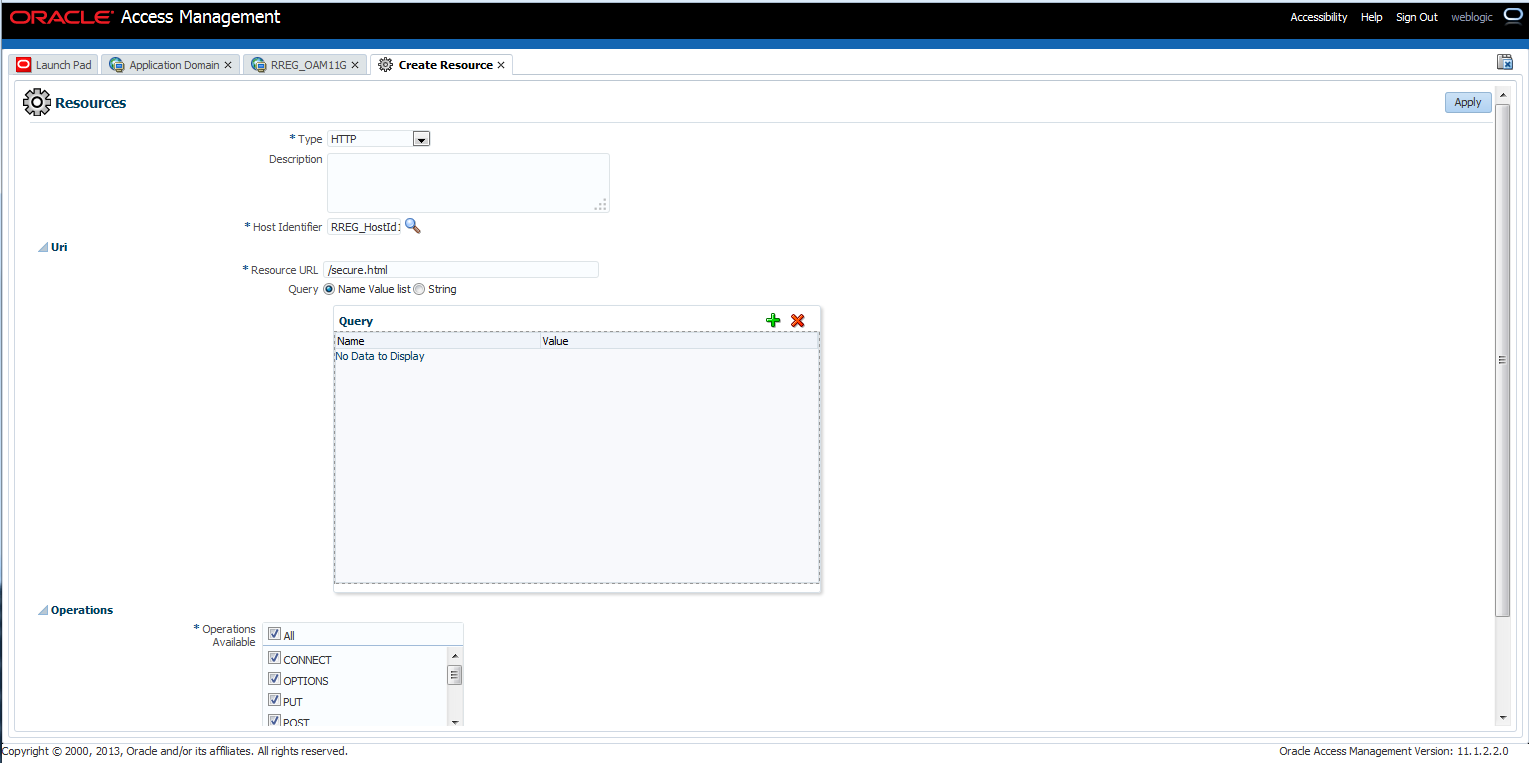
Click on Resources tab, then click Create


Select HTTP from the Type drop down

Host Identifier can be searched for using the search icon.  Enter RREG_HostId11G in the Host Identifier field

Enter /secure.html in Resource URL.  This is the resource that is going to be protected


Select Protected for Protection Level


Click Apply to continue

Close the RREG_OAM11G: RREG_HostID... tab

Click on the Autentication Policies tab then click on the Create Authentication Policy button

Enter a name for the policy, e.g X509_Test

Select X509Scheme for Authentication Scheme


The new policy will be displayed


Click on the Resources tab and the newly added resource that needs to be protected (secure.html) will be displayed.  Note that the new resource is not attached to any policy yet


Next, attach the resource to the newly created authentication policy.  Select the resource (secure.html) in the grid and click the Edit button.

From the Authentication Policy drop down, select X509_Test and click Apply


Close the RREG_OAM11G:RREG_HostId... tab

In the RREG_OAM11G tab, click the Search button which will show that secure.html is protected by the new X509_Test authentication scheme


Restart the OAM server for the changes to take effect

Now try and access the protected resource, secure.html in this case which hosted on http://10.10.107.89:7777/secure.html.  The HTTP request will be intercepted by the 11g Webgate and routed to OAM which will prompt you to present a client certificate:


The protected web page will be displayed:


Click the Logout link and you will be logged out and all session cookies will be removed:


You can view the Oracle Unified Directory (OUD) access_log located $OUD_HOME/logs and see the connection to the LDAP being made the the user CN being verified:

[21/May/2014:15:50:04 -0400] SEARCH REQ conn=29429 op=15 msgID=16 base="dc=acme,dc=com" scope=sub filter="(&(objectclass=inetOrgPerson)(cn=weblogic))" attrs="uid,wirelessacctnumber,postalcode,manager,street,orclguid,obresponsetries,dateofbirth,uniquename,defaultgroup,telephonenumber,obresponsetimeout,orgunit,timezone,employeenumber,obYetToBeAnsweredChallenge,initials,activestartdate,description,maidenname,localityname,gender,objectclass,sn,oblastloginattemptdate,fax,middlename,homeaddress,country,obpasswordhistory,cn,oblastsuccessfullogin,oblastfailedlogin,preferredlanguage,pobox,mobile,hiredate,uiaccessmode,oblastresponseattemptdate,department,state,givenname,lastname,org,employeetype,title,obfirstlogin,name,obpasswordcreationdate,homephone,pager,mail,activeenddate,oblockouttime,obAnsweredChallenges,loginid,firstname,obpasswordexpmail,obpasswordchangeflag,postaladdress,obuseraccountcontrol,telephone,displayname,oblogintrycount"
[21/May/2014:15:50:04 -0400] SEARCH RES conn=29429 op=15 msgID=16 result=0 nentries=1 etime=2
[21/May/2014:15:50:04 -0400] SEARCH REQ conn=29430 op=4 msgID=5 base="cn=weblogic,cn=systemids,dc=acme,dc=com" scope=base filter="(objectclass=inetOrgPerson)" attrs="uid,wirelessacctnumber,postalcode,manager,street,orclguid,obresponsetries,dateofbirth,uniquename,defaultgroup,telephonenumber,obresponsetimeout,orgunit,timezone,employeenumber,obYetToBeAnsweredChallenge,initials,activestartdate,description,maidenname,localityname,gender,objectclass,sn,oblastloginattemptdate,fax,middlename,homeaddress,country,obpasswordhistory,cn,oblastsuccessfullogin,oblastfailedlogin,preferredlanguage,pobox,mobile,hiredate,uiaccessmode,oblastresponseattemptdate,department,state,givenname,lastname,org,employeetype,title,obfirstlogin,name,obpasswordcreationdate,homephone,pager,mail,activeenddate,oblockouttime,obAnsweredChallenges,loginid,firstname,obpasswordexpmail,obpasswordchangeflag,postaladdress,obuseraccountcontrol,telephone,displayname,oblogintrycount"
[21/May/2014:15:50:04 -0400] SEARCH RES conn=29430 op=4 msgID=5 result=0 nentries=1 etime=2

Also, in the oam_server1.out log located $MW_HOME/user_projects/domains/WLSDomain//servers/oam_server1/logs, you can view the SSL key negotiation and exchange in progress and verification of the certificates.  This is only true if SSL debugging is turned on.

And in $MW_HOME/Oracle_WT1/instances/instance1/diagnostics/logs/OHS/ohs1 the access_log will show the initial connection being made as the user requests the resource.

Messing Around with C and Pointer Stuff

/*
An exercise in getting to grips with pointers and dynamic memory allocation. 

This program checks to see the largest chunk of memory that can be allocated on a RHEL system with 4GB memory.

Used some made up algorithm which is probably not very efficient but the purpose of this exercise was not to write efficient algorithms but just for my edification.
*/

#include <stdio.h>
#include <stdlib.h>

long lb = 0;
long ub = 4140949504;
const int O_SUCCESS = 0;
const int O_FAIL = 1;

void fx(long *, long *);
void range_calc(long *, long *, long *, int);

int main(void)
{
   char text[500];
   long sz, arr=10;
   fx(&lb, &ub);
   return 0;
}

void fx(long *p_lb, long *p_ub)
{
   long *array;
   long ctr = 0;
   int status = O_SUCCESS;
   long crnt_lb, crnt_ub, prev_lb, prev_ub;
   prev_lb = *p_lb; prev_ub = *p_ub;
   long mem_sz_to_test = prev_ub;

   while (1)
   {
      array = (long *)malloc(mem_sz_to_test * sizeof(long));

      if (array == 0)
      {
         printf("ERROR: While trying to allocate %lu bytes\n", mem_sz_to_test);
         // Split the range in half, test the lower limit
         crnt_ub = mem_sz_to_test;
         range_calc(&crnt_ub, &prev_lb, &crnt_lb, O_FAIL);
         mem_sz_to_test = crnt_lb;
         printf("1.\tlb = %lu, ub = %lu\n", crnt_lb, crnt_ub);
         printf("mem_sz_to_test = %lu\n", mem_sz_to_test);
      }
      else
      {
         printf("Allocated = %lu bytes\n", mem_sz_to_test * sizeof(long));
         free(array);
         prev_lb = crnt_lb;
         // Split the range in half, test the lower limit
         range_calc(&crnt_ub, &prev_lb, &crnt_lb, O_SUCCESS);
         printf("2.\tlb = %lu, ub = %lu\n", crnt_lb, crnt_ub);
         mem_sz_to_test = crnt_lb;
      }
      printf("ctr = %d\n\n", ctr++);
      if (ctr == 2500 || crnt_lb == crnt_ub) break;
   }
}


// Do the range split in half routine here
void range_calc(long *p_crnt_ub, long *p_prev_lb, long *p_crnt_lb, int STATUS)
{

   if (O_FAIL)
   {
      *p_crnt_lb = (*p_crnt_ub - *p_prev_lb)/2 + *p_prev_lb;
      if (*p_crnt_lb % 2 != 0)
         *p_crnt_lb = *p_crnt_lb + 1;
   }

   if (O_SUCCESS)
   {
      *p_crnt_lb = (*p_crnt_ub - *p_crnt_lb)/2 + *p_crnt_lb;
      if (*p_crnt_lb % 2 != 0)
         *p_crnt_lb = *p_crnt_lb + 1;
   }
}

Create and Deploy an 11g Webgate

Deploy Webgate

Note that this is an 11gR2PS2 environment running Weblogic 10.3.6 and Oracle Access Manager 11gR2PS2.

cd $MW_HOME/Oracle_OAMWebGate1/webgate/ohs/tools/deployWebGate

Run the following command (required for copying agent bits from the Webgate_Home directory to Webgate Instance location):
./deployWebGateInstance.sh -w $MW_HOME/Oracle_WT1/instances/instance1/config/OHS/ohs1 -oh $MW_HOME/Oracle_OAMWebGate1

Set LD_LIBRARY_PATH:
export LD_LIBRARY_PATH=$LD_LIBRARY_PATH:$MW_HOME/Oracle_WT1/lib

cd ../setup/InstallTools/

and run this command...
./EditHttpConf -w <Webgate_Instance_Directory> [-oh <Webgate_Oracle_Home>] [-o <output_file>]

where Webgate_Instance_Directory is the instance directory for ohs1
and Webgate_Oracle_Home is the home directory for the webgate

./EditHttpConf -w $MW_HOME/Oracle_WT1/instances/instance1/config/OHS/ohs1 -oh $MW_HOME/Oracle_OAMWebGate1 -o Edithttpconf.log

Sample output is shown below:
The web server configuration file was successfully updated
/opt/oracle/middleware/Oracle_WT1/instances/instance1/config/OHS/ohs1/httpd.conf has been backed up as
/opt/oracle/middleware/Oracle_WT1/instances/instance1/config/OHS/ohs1/httpd.conf.ORIG

Create Webgate

Oracle Access Management -> Launch Pad -> SSO Agents -> Create 11g Webgate
Choose a name, for example RREG_OAM11G and click Apply


In Logout Target URL, type end_url
In Logout URL, type
/logout1.html
/logout2.html

Click Apply again


Artifacts will be created in the following directory:
/opt/oracle/middleware/user_projects/domains/WLSDomain/output/OAM11gWebGate

Backup the OAM11GRequest.xml file
cd $MW_HOME/Oracle_IDM1/oam/server/rreg/input

cp OAM11GRequest.xml NewOAM11GRequest.xml

Edit NewOAM11GRequest.xml and add the correct values for serverAddress and agentBaseUrl
<serverAddress>http://localhost:7001</serverAddress>
<agentBaseUrl>http://localhost:7001</agentBaseUrl>

Start the process to complete the agent registration
cd ..
You should now be in the $MW_HOME/Oracle_IDM1/oam/server/rreg/bin directory.  Run the following command (with output shown):
./bin/oamreg.sh inband input/NewOAM11GRequest.xml

----------------------------------------
Request summary:                                                               
OAM11G Agent Name:RREG_OAM11G                                                  
Base URL:http://localhost:7001                                                 
URL String:RREG_HostId11G                                                      
Registering in Mode:inband                                                     
Your registration request is being sent to the Admin server at: http://localhost:7001
----------------------------------------  

Now copy the artifacts as follows:
cp $MW_HOME/Oracle_IDM1/oam/server/rreg/output/RREG_OAM11G/cwallet.sso $MW_HOME/Oracle_WT1/instances/instance1/config/OHS/ohs1/webgate/config

cp $MW_HOME/Oracle_IDM1/oam/server/rreg/output/RREG_OAM11G/ObAccessClient.xml $MW_HOME/Oracle_WT1/instances/instance1/config/OHS/ohs1/webgate/config

Restart OHS
cd $MW_HOME/Oracle_WT1/instances/instance1/bin
./opmnctl stopall
./opmnctl startall

...and check if domain got created in OAM as follows:
Launch Pad -> Access Manager -> Applications Domains
Click Search


Friday, May 16, 2014

Enable SSL Debugging for Oracle Access Manager 11gR2

For debugging SSL connections terminating on the Weblogic Server, from Weblogic Administration Console, click on Servers, select oam_server1:


Click on the Server Start tab and add -Dssl.debug=true -Dweblogic.StdoutDebugEnabled=true in the Arguments section:


Restart oam_server1.  SSL-debug information will be written to the oam_server1.log (located in $MW_HOME/domains/WLSDomain/servers/oam_server1/logs):

...
...
...
####<May 16, 2014 2:30:25 PM EDT> <Debug> <SecuritySSL> <svrtst02.isedlab.org> <oam_server1> <[ACTIVE] ExecuteThread: '1' for queue: 'weblogic.kernel.Default (self-tuning)'> <<WLS Kernel>> <> <114848da72d7dcfc:-3a0c05c9:14605a3f20e:-8000-0000000000001794> <1400265025295> <BEA-000000> <Validating certificate 1 in the chain: Serial number: 207182277780947434404477757924094648847
Issuer:C=US, O=U.S. Government, OU=DoD, OU=NRO, CN=ISED lab Root
Subject:C=US, O=U.S. Government, OU=DoD, OU=NRO, OU=CA, CN=CAD CA 1
Not Valid Before:Thu Jun 14 10:00:16 EDT 2012
Not Valid After:Sun Jun 14 10:00:16 EDT 2015
Signature Algorithm:SHA1withRSA
>
####<May 16, 2014 2:30:25 PM EDT> <Debug> <SecuritySSL> <svrtst02.isedlab.org> <oam_server1> <[ACTIVE] ExecuteThread: '1' for queue: 'weblogic.kernel.Default (self-tuning)'> <<WLS Kernel>> <> <114848da72d7dcfc:-3a0c05c9:14605a3f20e:-8000-0000000000001794> <1400265025295> <BEA-000000> <validationCallback: validateErr = 0>
####<May 16, 2014 2:30:25 PM EDT> <Debug> <SecuritySSL> <svrtst02.isedlab.org> <oam_server1> <[ACTIVE] ExecuteThread: '1' for queue: 'weblogic.kernel.Default (self-tuning)'> <<WLS Kernel>> <> <114848da72d7dcfc:-3a0c05c9:14605a3f20e:-8000-0000000000001794> <1400265025296> <BEA-000000> <  cert[0] = Serial number: 85355980927748066409252166003794705697
Issuer:C=US, O=U.S. Government, OU=DoD, OU=NRO, OU=CA, CN=CAD CA 1
Subject:C=US, O=U.S. Government, OU=DoD, OU=NRO, CN=weblogic
Not Valid Before:Fri May 09 16:24:56 EDT 2014
Not Valid After:Sun Jun 14 09:59:16 EDT 2015
Signature Algorithm:SHA1withRSA
>
####<May 16, 2014 2:30:25 PM EDT> <Debug> <SecuritySSL> <svrtst02.isedlab.org> <oam_server1> <[ACTIVE] ExecuteThread: '1' for queue: 'weblogic.kernel.Default (self-tuning)'> <<WLS Kernel>> <> <114848da72d7dcfc:-3a0c05c9:14605a3f20e:-8000-0000000000001794> <1400265025296> <BEA-000000> <  cert[1] = Serial number: 207182277780947434404477757924094648847
Issuer:C=US, O=U.S. Government, OU=DoD, OU=NRO, CN=ISED lab Root
Subject:C=US, O=U.S. Government, OU=DoD, OU=NRO, OU=CA, CN=CAD CA 1
Not Valid Before:Thu Jun 14 10:00:16 EDT 2012
Not Valid After:Sun Jun 14 10:00:16 EDT 2015
Signature Algorithm:SHA1withRSA
>
...
...
...

When using Firefox and passing your SSL certificate to the server, if the "Remember this decision" is checked, Firefox will not prompt you again for the cert:


While testing, it's good to reset this behavior so that you will be always prompted to select a certificate to present to the server.  To do this, from Firefox Tools -> Options -> Privacy -> clear your recent history:


Check Active Logins and un-check everything else and click Clear Now.  This will prompt for a client cert to be selected.